
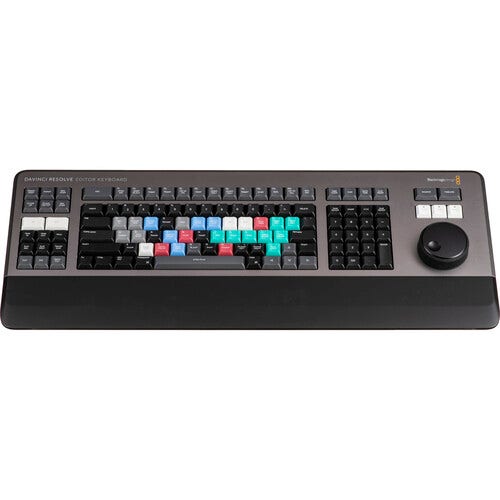
DaVinci Resolve Editor Keyboard
- All-Metal Design with Handrest
- High-Quality Keys with Tiered Profile
- Premium Search Wheel
- Fast In and Out Points
Metal Design with Premium Keys
The all-metal design includes keys with a tiered profile, instead of flat keys, so it's easy to feel your way around. The key switches are the same type used by eSports keyboards and each key is certified for over a million operations. The integrated search dial is machined from solid metal and allows for very precise transport and trimming control. There's also a handrest with a soft feel to help reduce fatigue. Plus, the key caps, handrest, and key switches are all available as spare parts so the keyboard can be refreshed and repaired over time.
Integrated Search Dial Control
The metal search dial features rubber coating and is designed with multiple roller bearings that allow for smooth operation. There's an integrated electronic clutch that creates end stops when used for shuttle and position. The dial can also be spun in jog mode to allow a natural timeline scroll. The jog control allows free movement for precise positioning of the playback point. Shuttle uses the clutch, and you can rotate forward and reverse wind to move up and down the timeline. Scroll allows scrolling up and down a long edit to navigate quickly.
Fast Source Tape Allows Scrolling Clips
The innovative source button instantly creates a "source tape" of all the clips in your bin. Now you can simply scroll up and down all your media without the need to navigate thousands of clips. The clip being viewed is also highlighted in the bin in real time. Switching between the source tape and timeline is instant.
Instantly Re-Sort Bin and Source Tape
The source tape uses your bin's sort order, so you get lots of control over how shots are organized. This gives you the flexibility to find shots by time, camera, duration, or even clip name. The moment one of the bin sort buttons is selected, the source tape will be regenerated in that bin's sort order. Simply scroll up and down the source tape to find the shots needed. Sort by timecode to see all the bin media sorted by time, which is highly useful for content shot in time order, such as live events. You can also sort by camera, ideal for multicamera shoots where you lay down the wide shot first and then look for cutaways on other cameras. You can even sort by duration and the clip name.
| Brands | Blackmagic Design |
|---|---|
| Sale | No |
| Product Weight | 1.000000 |
| Cashback Enable | No |
Write Your Own Review