
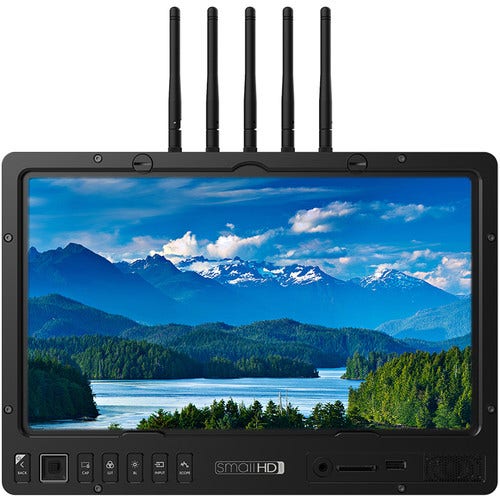
SmallHD 1303 Hdr Production V-Mount Monitor Bundle
- 1303 Rugged HDR Production Monitor
- Thin SDI Cables
- RapidRail Accessory Attachment
- C-Stand Mount
- Standard and Matte Screen Protectors
- Sun Hood
- V-Mount Power Kit + Cheese Plate
Built-In Wireless Receiver
Compatible with Teradek Bolt 500, 1000, 3000, and Focus Bolt/Cine 7 500 transmitters.
PageBuilder OS
Originally featured in the 500 and 700-series models, and extrapolated for the Production Monitor series, the PageBuilder OS is an intuitive graphical user interface (GUI) that puts all the advanced functionality of the 1703 at your fingertips. Rather than have confusing menus, this GUI allows you to selectively apply monitoring tools such as waveform, vectorscope, multiview, and focusing aids to different "pages". These pages can be easily flipped through using the joystick, or selected with the four quick-access buttons on the front panel. Additional buttons on the front panel can toggle monitoring tools on and off for each page.
3D LUT Processing
To keep your images consistent from production through to post-production, import 3D LUTs and display the treated image side by side with the untreated image, to correctly gauge exposure while visualizing what is being recorded by the camera. A side-by-side preview can also be used with the HDR preview function. Separate LUT-treated images can be sent downstream over SDI and HDMI, so you can have the 1303 display a log image or LUT-treated image, while the director or client monitors connected to the outputs can receive images treated with a different LUT. An image capture function saves a still frame from the incoming video stream onto an SD card, and records the applied 3D LUT for post-production reference.
On-Set Problem Solving
The PageBuilder OS has a dedicated Output Preview page which allows you to apply LUTs and other image adjustments specific to the output signal from the monitor.
HD Scopes
Fill the screen with up to three simultaneous scopes, including waveform, vectorscope, and histogram, while still being able to observe the camera feed. The Color Picker function can analyze the raw color values of any individual pixel in the frame.
Exposure Tools
Exposure assist supports both ARRI and Rainbow false color. Utilize zebra lines to warn you when reaching a brightness level of your choosing. This is great for matching exposure across shots and cameras.
Focus Assist and Peaking Tools
Focus assist creates a bright highlight on in-focus subject matter—highly recommended when focusing on the fly. Focus Peaking increases the image sharpness, allowing for more detailed focusing. The color and intensity of the peaking can be adjusted to your preference.
| Face Detection | No |
|---|---|
| Best Seller | No |
| Sale | No |
| Max Resolution | 1920 x 1080 |
| Supported Formats | SDI: 8-bit YCC 4:2:2 1080p23.98/24/25/29.97/30/50/59.94/60 1080PsF23.98/24/25/29.97/30 1080i50/59.94/60 (high-speed: 1080i100/119.88/120) 720p23.98/24/25/29.97/30/50/59.94/60 HDMI: 8-bit YCC 4:2:2, 8/10/12-bit RGB and YCC 4:4:4 1080p23.98/24/25/29.97/30/ |
| Pixels | Pixel Density 170 PPI |
| Relative brightness | 1500 cd/m² |
| Aspect Ratio | 16:9 |
| Color Spaces | 10-bit, 100% REC709 |
| Connectivity | Inputs 2 x SDI 1 x HDMI Outputs 2 x SDI 1 x HDMI |
| Panoroma Mode | No |
| Dimensions | 13" / 33 cm |
| Product Weight | 83.600000 |
| Brands | smallHD |
| Wi-Fi Enabled | Yes |
| External Battery Charger | No |
| HDR Mode | No |
| Landing Gear/Legs Included | Yes |
Write Your Own Review